Build Wireframes and Low-Fidelity Prototypes is the third course in a certificate program that will equip you with the skills you need to apply to entry-level jobs in user experience (UX) design. In this course, you’ll continue to design a mobile app for your professional UX portfolio. You’ll start by creating storyboards and getting familiar with the basics of drawing. Then, you'll create paper wireframes and digital wireframes using the design tool Figma. You’ll also create a paper prototype and a digital low-fidelity prototype in Figma.

Build Wireframes and Low-Fidelity Prototypes

Build Wireframes and Low-Fidelity Prototypes
This course is part of Google UX Design Professional Certificate

Instructor: Google Career Certificates
Access provided by University of Warwick
417,687 already enrolled
Gain insight into a topic and learn the fundamentals.
9,650 reviews
Beginner level
No prior experience required
Flexible schedule
1 week at 10 hours a week
Learn at your own pace
99%
Most learners liked this course
What you'll learn
Create storyboards to come up with ideas about solutions to user needs.
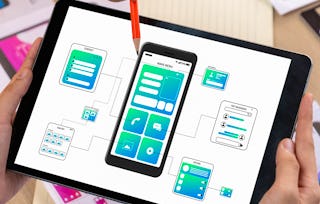
Create wireframes on paper and digitally in the design tool Figma.
Build paper prototypes to create interactive designs.
Design low-fidelity prototypes in Figma.
Skills you'll gain
Tools you'll learn
Details to know

Shareable certificate
Add to your LinkedIn profile
Taught in English
See how employees at top companies are mastering in-demand skills

Build your Design and Product expertise
This course is part of the Google UX Design Professional Certificate
When you enroll in this course, you'll also be enrolled in this Professional Certificate.
- Learn new concepts from industry experts
- Gain a foundational understanding of a subject or tool
- Develop job-relevant skills with hands-on projects
- Earn a shareable career certificate from Google

There are 3 modules in this course
Earn a career certificate
Add this credential to your LinkedIn profile, resume, or CV. Share it on social media and in your performance review.
Instructor
Instructor ratings
(3,103 ratings)Offered by

Why people choose Coursera for their career

Felipe M.
Learner since 2018
"To be able to take courses at my own pace and rhythm has been an amazing experience. I can learn whenever it fits my schedule and mood."

Jennifer J.
Learner since 2020
"I directly applied the concepts and skills I learned from my courses to an exciting new project at work."

Larry W.
Learner since 2021
"When I need courses on topics that my university doesn't offer, Coursera is one of the best places to go."

Chaitanya A.
"Learning isn't just about being better at your job: it's so much more than that. Coursera allows me to learn without limits."
Learner reviews
- 5 stars
88.94%
- 4 stars
9.38%
- 3 stars
1.15%
- 2 stars
0.19%
- 1 star
0.32%
Showing 3 of 9650
PK
Reviewed on Jan 17, 2023
This was the most exciting part of this entire course ! Learning the basics of Figma & developing real time Prototypes on Figma, Making SB & Wireframes everything was very refreshing !
TC
Reviewed on Sep 18, 2022
Good course with proper instructors and information. The thing to improve is the volumn in each clip. I found that some are pretty loud and some are low which provides a not-so-good user experience.
BG
Reviewed on Jan 15, 2026
This course gives you a clear foundation of how to use figma and everything that low-fidelity protypes entail, while it may seem or be intimidating, trust me that they make it very simple and clear!
Explore more from Computer Science

California Institute of the Arts

¹ Some assignments in this course are AI-graded. For these assignments, your data will be used in accordance with Coursera's Privacy Notice.