KS
5.0Reviewed Oct 9, 2025
This was confusing a little because my screen didn't match what was shown so I had to find what he was mentioning, but he was an amazing teacher. He was easy to follow and humorous at times!

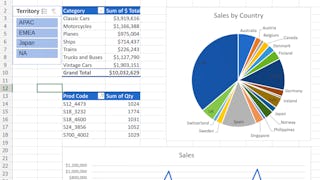
This 1-hour, project-based course introduces learners to the powerful pivot table feature of most spreadsheet applications. We’ll be using Excel on the Web in this project, which is the free spreadsheet application offered by Microsoft. However, many of the concepts that you will learn in this project will be applicable to other spreadsheet programs, such as LibreOffice Calc and Google Sheets. We will cover the following concepts in a hands-on manner: - Introduction to the functionality of pivot tables. - Application of pivot tables to quickly summarize large amounts of raw data in detail. - Visualize generated data from pivot tables for accessible information at a glance using charts. Please Note: If you don't have a free Microsoft account, you will need to create one to be able to complete the content.
KS
This was confusing a little because my screen didn't match what was shown so I had to find what he was mentioning, but he was an amazing teacher. He was easy to follow and humorous at times!
TC
Instructor speaks clearly and at a very good pace to understand. His examples and sample documents and various pivot tables and charts were great.
DE
A good course but I am using a different version so not all instructions in the video worked. My issue was already on the forum and had been unanswered for months.
JG
As I put in the Survey, major issue is translating this to Mac or Apple products. Otherwise, great way to get acquainted with Pivot Tables.
GD
Like the instructor, keep you engaged with Excel, Not a fast-paced class, wish there was a key terms/icon legend to refer to
KC
Either the course was out dated or the cloud EXCEL works differently with Macs. I did not have the ability to resize the charts.
AQ
Very informative and useful course regarding pivot tables and charts. I just felt that the instructor took a lot of time on formatting of the table. Otherwise it was pretty good.
SA
Best course to clearly understand about Pivot Table and chart creation.
FA
Excellent tutorial including guided trainer examples.
ME
it's very helpful and I enjoyed with it , Now i enable to create. charts and dashboard
TE
I had no experience in excel prior to this course and I was able to complete it with confidence. A great course and a really good instructor
AW
Very useful and really friendly and easy to learn
Showing: 20 of 48
The course was interesting. However, I had a big setback for a couple of reasons. First, the version of Excel used is older than mine and I lost a lot of time trying to figure out how to do the tasks that the instructor/video was telling me to do. Second, and most annoying reason, was when the instructor showed a formula to extract the month from a date range. In my version of Excel, the formula did not work. And I could not find help anywhere. In the discussion forum, I found another student that experienced the same issue 10 months ago and asked for help. But no one responded. What kind of class is this that the instructor doesn't respond to a student's request for help? I understand if this is a free course on YouTube. But I paid for this course.
Valuable course and good instructor, but technical issues with reaching, editing and manipulating the file with Excel Online, and difficulty of both following the instructor and working on your file at the same time was difficult. If you have two monitors, or can use the laptop for one and your monitor for the other, then separate screens should make it easy.
The content was good and valuable, but I felt like two hours significantly underestimates the time I devoted to it, given that I had to go back and forth and do those things at the same time as the instructor. I would say I spent 5-6 hours in total. The course was loaded, applying all you learn sometimes takes time.
A good course but I am using a different version so not all instructions in the video worked. My issue was already on the forum and had been unanswered for months.
Like the instructor, keep you engaged with Excel, Not a fast-paced class, wish there was a key terms/icon legend to refer to
Instructor speaks clearly and at a very good pace to understand. His examples and sample documents and various pivot tables and charts were great.
Best course to clearly understand about Pivot Table and chart creation.
Excellent tutorial including guided trainer examples.
Thanks to University of Penn for giving me the opportunity to learn from highly skilled trainers to teach me Excel for Beginners: Pivot Tables. The course is very good and is for people who are looking to develop their career in Micorsoft Excel. Taking this course has been a added advantage to my career goals.
I enjoyed this class. I particularly appreciated the instructor. I ran into an issue see in the Pivot Table the column I added. I wish the guided projected provided support with that. It might be the set up with the side by side. I was able to try on another browser and I was able to implement. Thank you!
As I put in the Survey, major issue is translating this to Mac or Apple products. Otherwise, great way to get acquainted with Pivot Tables.
Either the course was out dated or the cloud EXCEL works differently with Macs. I did not have the ability to resize the charts.
This course is slightly outdated with the web version of excel and would have been much easier to understand on the desktop version. I have never been a fan of any kind of instruction that tries to explain something that the program can't do. Teaching is seeing. I also didn't care for the side-by-side learning. It was very difficult on a laptop. Other courses, have video and written instruction that is much more effective. Overall, I was able to understand how to create a Pivot Table and it's something I will do test runs with to gain knowledge before starting a new role that utilizes it.
not impressed...had to create a Microsoft account...then got an error message saying access denied...i should not have to create an account...this should be easier
his guided project was very helpful and practical. The step-by-step instructions made it easy to follow, and I gained hands-on experience with real data. I feel more confident now using these skills in my work. Highly recommended for anyone who wants to quickly learn by doing.
This was confusing a little because my screen didn't match what was shown so I had to find what he was mentioning, but he was an amazing teacher. He was easy to follow and humorous at times!
I had no experience in excel prior to this course and I was able to complete it with confidence. A great course and a really good instructor
it's very helpful and I enjoyed with it , Now i enable to create. charts and dashboard
Very useful and really friendly and easy to learn
Clear instructions, concise and engaging videos.
很有收获,有可以直接操作的环境,学到了切片器连接多个透视图,条件样式显示进度条,用透视图作图标