YM
5.0Reviewed Feb 27, 2023
Great learning from Coursera and it was wonderful journey while learning, thank for a grateful content.

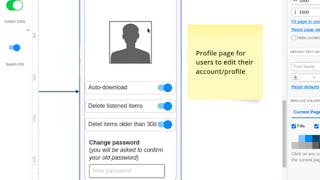
In this 2-hour long project-based course, you will learn how to create an interaction design flow, design wireframes for all steps of a podcast mobile app (sign in, sign up, user profile, search and sort, play and play controls pages/sections), transform wireframes into mockups. Note: This course works best for learners who are based in the North America region. We’re currently working on providing the same experience in other regions.
YM
Great learning from Coursera and it was wonderful journey while learning, thank for a grateful content.
JC
The instructor explains the steps very clearly and the students have the same Moqups version as the instructor. In turn, this allows the student to follow the Instructor as is to make the Mobile app.
Showing: 14 of 14
good
The course introduces Moqups and demonstrates some design thinking. It is easy to follow. From the software perspective it only introduces users to very few functions (create page, add/delete element, add photo, move element, resize, change colours, arrange)
The instructor explains the steps very clearly and the students have the same Moqups version as the instructor. In turn, this allows the student to follow the Instructor as is to make the Mobile app.
Great learning from Coursera and it was wonderful journey while learning, thank for a grateful content.
Easy to follow, understable. Thank you!
VERY USEFUL TOOL FOR STARTUP
i satisfied all is well
Πολύ καλό μάθημα.
Great approach!
MUCH BETTER
good
A user flow (or flow chart) is the foundational step. Its purpose is to map out the user journey—the sequence of steps and decisions a user takes to achieve a goal. Doing this prior to visual design ensures the interface is logical, efficient, and addresses all necessary interactions before time is spent on detailed graphics and code.
ddd
its ok