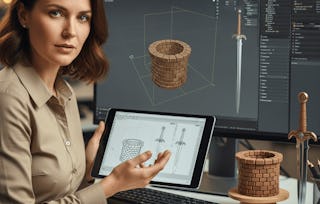
By the end of this course, learners will be able to sculpt detailed 3D models, paint realistic textures, generate normal and displacement maps, apply advanced bump techniques, and export production-ready assets for games and films. You will gain hands-on expertise in Autodesk Mudbox by mastering the interface, customizing workflows, and practicing viewport navigation to achieve accurate forms. Through guided lessons, you will explore curve loops, subdivision, projection painting, and non-destructive sculpt layers to refine surfaces with precision.
What makes this course unique is its complete end-to-end pipeline coverage—from importing external objects and managing paint layers to baking ambient occlusion and enhancing textures in Photoshop. With a strong focus on real-world workflows, you will learn not just how to use Mudbox tools, but when and why to apply them for professional results. Whether your goal is character design, digital sculpting, or asset export for game engines, this course equips you with the skills to create polished 3D models with efficiency and realism.
This module introduces the essentials of Autodesk Mudbox, including normal and displacement maps, paint workflows, viewport navigation, and texture basics. Learners will build a strong foundation in using the interface, organizing paint layers, and creating early surface textures for sculpting and exporting assets.
Das ist alles enthalten
11 Videos4 Aufgaben
Infos zu Modulinhalt anzeigen
11 Videos•Insgesamt 41 Minuten
Extracting Normal and Displacement Maps - for Asset Export•5 Minuten
Introduction to Painting Textures•1 Minute
Viewport Navigation and Camera Control - Best Practices•5 Minuten
Enhancing Surfaces with Bump Painting - for Realistic Skin•3 Minuten
Hair and Fur and Importing Objects - for Hair and Fur•4 Minuten
Overview of Autodesk Mudbox and Interface•2 Minuten
Exporting Paint Layers to Photoshop - for Asset Export•5 Minuten
Texturing Workflows with Stencils and Stamps•7 Minuten
Exporting Paint Layers to Photoshop - Best Practices•2 Minuten
Importing Objects•3 Minuten
Importing External Objects into Mudbox - Best Practices•4 Minuten
This module focuses on preparing models for detailed sculpting by using curves, subdivision, and displacement techniques. Learners will explore workflows for bump painting, normal/displacement maps, and the Grab tool, while mastering non-destructive sculpting for advanced skin and hair effects.
Das ist alles enthalten
11 Videos4 Aufgaben
Infos zu Modulinhalt anzeigen
11 Videos•Insgesamt 88 Minuten
Importing External Objects into Mudbox - for Realistic Skin•4 Minuten
Modeling Guides with Curve Loop and Border Curve - for Asset Export•9 Minuten
Viewport Navigation and Camera Control - Workflow•3 Minuten
Subdividing Geometry for High Detail - for Eyes and Nose•9 Minuten
Extracting Normal and Displacement Maps - with Texture Channels•10 Minuten
Enhancing Surfaces with Bump Painting - for Eyes and Nose•12 Minuten
Modeling Guides with Curve Loop and Border Curve - for Realistic Skin•10 Minuten
Reshaping Models with the Grab Tool•8 Minuten
Exporting Paint Layers to Photoshop - for Realistic Skin•8 Minuten
Enhancing Surfaces with Bump Painting - Workflow•9 Minuten
Non Destructive Sculpting with Layers - for Hair and Fur•7 Minuten
This module advances skills in object handling, ambient occlusion, and projection painting. Learners will practice transform operations, refine shading with smooth shading, and enhance paint workflows through Photoshop exports and well-organized layer structures.
Das ist alles enthalten
11 Videos4 Aufgaben
Infos zu Modulinhalt anzeigen
11 Videos•Insgesamt 70 Minuten
Subdividing Geometry for High Detail - Best Practices•5 Minuten
Viewport Navigation and Camera Control - Techniques•6 Minuten
Viewport Navigation and Camera Control - Methods•10 Minuten
Creating Ambient Occlusion for Realistic Shading - Best Practices•3 Minuten
Transforming and Scaling Objects•9 Minuten
Projection Painting with Stencils•5 Minuten
Importing External Objects into Mudbox - with Smooth Shading•7 Minuten
Exporting Paint Layers to Photoshop - Workflow•7 Minuten
Creating and Managing Paint Layers - for Nose Detailing•5 Minuten
Smoothing Surfaces Effectively - for Eyes and Nose•6 Minuten
Exporting Paint Layers to Photoshop - Techniques•7 Minuten
4 Aufgaben•Insgesamt 60 Minuten
Subdivision, Navigation Techniques & AO Basics•10 Minuten
This module explores the full potential of Mudbox’s sculpting brushes and refinement tools. Learners will work with smoothing, Foamy, Flatten, and bump brushes while combining curve guides and non-destructive sculpting techniques for precise surface detailing.
Das ist alles enthalten
11 Videos4 Aufgaben
Infos zu Modulinhalt anzeigen
11 Videos•Insgesamt 85 Minuten
Smoothing Surfaces Effectively - for Realistic Skin•8 Minuten
Hair and Fur and Importing Objects - Workflow•5 Minuten
Non Destructive Sculpting with Layers - for Eyes and Nose•8 Minuten
Non Destructive Sculpting with Layers - Workflow•7 Minuten
Enhancing Surfaces with Bump Painting - Techniques•7 Minuten
Soft Detailing with the Foamy Brush•5 Minuten
Leveling Forms with the Flatten Brush•7 Minuten
Enhancing Surfaces with Bump Painting - for Nose Detailing•8 Minuten
Enhancing Surfaces with Bump Painting - Methods•8 Minuten
Modeling Guides with Curve Loop and Border Curve - Workflow•11 Minuten
Modeling Guides with Curve Loop and Border Curve - Techniques•11 Minuten
The final module covers advanced texturing, baking, and export workflows. Learners will extract normal/displacement maps, generate high-resolution ambient occlusion, and refine textures in Photoshop for hair, fur, and skin realism. Creative camera use is emphasized for professional results.
Das ist alles enthalten
11 Videos4 Aufgaben
Infos zu Modulinhalt anzeigen
11 Videos•Insgesamt 75 Minuten
Enhancing Surfaces with Bump Painting - Tips and Tricks•6 Minuten
Creating and Managing Paint Layers - for Realistic Skin•7 Minuten
Exporting Paint Layers to Photoshop - for Nose Detailing•8 Minuten
Exporting Paint Layers to Photoshop - for Hair and Fur•10 Minuten
Enhancing Surfaces with Bump Painting - for Hair and Fur•7 Minuten
Importing External Objects into Mudbox - for Asset Export•4 Minuten
Creating Ambient Occlusion for Realistic Shading - for Asset Export•7 Minuten
Extracting Normal and Displacement Maps - for Game Assets•7 Minuten
Creating Ambient Occlusion for Realistic Shading - at High Resolution•8 Minuten
Viewport Navigation and Camera Control - Tips and Tricks•6 Minuten
Viewport Navigation and Camera Control - Creative Approach•6 Minuten
4 Aufgaben•Insgesamt 60 Minuten
Advanced Bump & Paint Layer Control•10 Minuten
Export for Specialized Areas: Nose, Hair & Fur•10 Minuten
Welcome to EDUCBA, a place where knowledge is limitless! We provide a wide selection of instructive and engaging programmes designed to empower students of all ages and experiences. From the convenience of your home, start a revolutionary educational experience with our cutting-edge technologies courses and experienced instructors.
When will I have access to the lectures and assignments?
To access the course materials, assignments and to earn a Certificate, you will need to purchase the Certificate experience when you enroll in a course. You can try a Free Trial instead, or apply for Financial Aid. The course may offer 'Full Course, No Certificate' instead. This option lets you see all course materials, submit required assessments, and get a final grade. This also means that you will not be able to purchase a Certificate experience.
What will I get if I purchase the Certificate?
When you purchase a Certificate you get access to all course materials, including graded assignments. Upon completing the course, your electronic Certificate will be added to your Accomplishments page - from there, you can print your Certificate or add it to your LinkedIn profile.
Is financial aid available?
Yes. In select learning programs, you can apply for financial aid or a scholarship if you can’t afford the enrollment fee. If fin aid or scholarship is available for your learning program selection, you’ll find a link to apply on the description page.