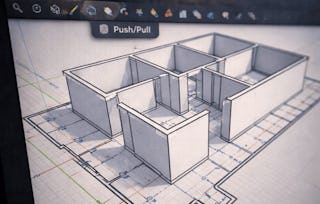
Do you want to obtain all the necessary skills of a 3D modeler? Do you want to know how an engineer develop a building model in details? The “3D CAD Application” course, the second course of the new specialization, is coming!
After finishing this course: You will be able to know how to use the SketchUp’s advanced functions by creating 3D building models. You will be able to develop a building as an engineer.
Let’s start the learning journey!
This module includes the course syllabus, grading policy and tips to learn modeling well.
What's included
2 videos2 readings
Show info about module content
2 videos•Total 6 minutes
Welcome to CAD&BIM specialization•4 minutes
101 Course overview•2 minutes
2 readings•Total 20 minutes
102 Syllabus and grading policy•10 minutes
Course FAQs•10 minutes
Basis of 3D modeling: Learn basic concept and start modeling
Module 2•1 hour to complete
Module details
This module includes some crucial concepts and tips for modeling.Learners will learn how to import the 1F plan and be familiar with the entire process.
What's included
3 videos1 reading1 assignment
Show info about module content
3 videos•Total 17 minutes
201 Process of 3D modeling•7 minutes
202 Notice of 3D modeling•8 minutes
203 Import CAD files into SketchUp•3 minutes
1 reading•Total 10 minutes
Working files•10 minutes
1 assignment•Total 30 minutes
Quiz1: Basic concept of 3D modeling•30 minutes
Building Structure: Create columns, walls, beams and slabs
Module 3•1 hour to complete
Module details
This module includes methods to develop structure of the building model. Learners will start from 1F slabs, columns, walls and beams. It also includes the use of grouping objects in SketchUp.
What's included
6 videos1 assignment
Show info about module content
6 videos•Total 28 minutes
301 Group of 3D models•5 minutes
302 Create First Floor's Slab•4 minutes
303 Create columns•3 minutes
304 Create walls•4 minutes
305 Create beams•9 minutes
306 Readjust heights of walls•2 minutes
1 assignment•Total 30 minutes
307 Quiz2: Use of Group and creating building structure•30 minutes
Staircases: Create staircases and railings
Module 4•2 hours to complete
Module details
This module covers the process of creating staircases and handrails. Learners will learn how to draw staircases according to 1F plan, and how to use array and group functions to simplified modeling process.
What's included
7 videos1 assignment1 peer review
Show info about module content
7 videos•Total 31 minutes
401 Create first part of staircase and platform•5 minutes
402 Create second and third parts of staircase•6 minutes
403 Adjust and Group staircase•2 minutes
404 Create railing of first-part staircase•5 minutes
405 Create railing of second-part staircase•5 minutes
406 Create railing of third-part staircase•5 minutes
407 Create and Groupsecond floor slab•3 minutes
1 assignment•Total 30 minutes
408 Quiz3: creating staircases and railings•30 minutes
1 peer review•Total 60 minutes
409 Peer review 1: modeling of structure and staircases•60 minutes
Windows: Create detailed components
Module 5•1 hour to complete
Module details
This module includes tips to create complex windows and doors. Learners will learn about components and create some important components.
What's included
7 videos1 assignment
Show info about module content
7 videos•Total 43 minutes
501 Component•6 minutes
502 Create a window component-W2•9 minutes
503 Create a window component-DW1•9 minutes
504 Create a window component-DW2•6 minutes
505 Create a door component-D4•3 minutes
506 Paint and modify D4•6 minutes
507 Create the doorknob of D4 and make it component•5 minutes
1 assignment•Total 30 minutes
508 Quiz 4: creating components•30 minutes
Modify and Place Component: Place components into building model
Module 6•1 hour to complete
Module details
This module demonstrates how to place components created in module 5 or from 3D Warehouse, including windows, doors and air conditioning inlet. Learners will learn to modify components and place them into the building model.
What's included
6 videos1 assignment
Show info about module content
6 videos•Total 22 minutes
601 Import components•3 minutes
602 Create spaces and place W2•3 minutes
603 Make Component of Air conditioning inlet•4 minutes
604 Place Iron rolling door component SD1•3 minutes
605 Place D1 and D4 component•4 minutes
606 Place restroom door•5 minutes
1 assignment•Total 30 minutes
607 Quiz 5: modify and place components•30 minutes
Model Assembling and Materials: Complete this building model
Module 7•2 hours to complete
Module details
This module covers model assembling and decoration. Learners will be familiar with concept of model assembling and setting of materials and shadow. In this module, learners will finally complete the model.
What's included
7 videos1 reading1 assignment1 peer review
Show info about module content
7 videos•Total 23 minutes
701 Concept of model assembling•6 minutes
702 Materials and shadow•4 minutes
703 Check the surface of model•2 minutes
704 Collect, create and modify materials•2 minutes
705 Paint and assemble the models of every floor•5 minutes
706 Shadow of the whole model•2 minutes
707 Export the model•2 minutes
1 reading•Total 10 minutes
Working files•10 minutes
1 assignment•Total 30 minutes
708 Quiz 6: model assembling and materials•30 minutes
1 peer review•Total 60 minutes
709 Peer review 2: complete building model•60 minutes
Closure: Review and preview
Module 8•6 minutes to complete
Module details
This module includes course review and a short introduction of next course: BIM Application.
What's included
2 videos
Show info about module content
2 videos•Total 6 minutes
801 Review•5 minutes
802 Move on your journey of 3D modeling•1 minute
Instructor
Instructor ratings
Instructor ratings
We asked all learners to give feedback on our instructors based on the quality of their teaching style.
We firmly believe that open access to learning is a powerful socioeconomic equalizer. NTU is especially delighted to join other world-class universities on Coursera and to offer quality university courses to the Chinese-speaking population. We hope to transform the rich rewards of learning from a limited commodity to an experience available to all.
When will I have access to the lectures and assignments?
To access the course materials, assignments and to earn a Certificate, you will need to purchase the Certificate experience when you enroll in a course. You can try a Free Trial instead, or apply for Financial Aid. The course may offer 'Full Course, No Certificate' instead. This option lets you see all course materials, submit required assessments, and get a final grade. This also means that you will not be able to purchase a Certificate experience.
What will I get if I subscribe to this Specialization?
When you enroll in the course, you get access to all of the courses in the Specialization, and you earn a certificate when you complete the work. Your electronic Certificate will be added to your Accomplishments page - from there, you can print your Certificate or add it to your LinkedIn profile.
Is financial aid available?
Yes. In select learning programs, you can apply for financial aid or a scholarship if you can’t afford the enrollment fee. If fin aid or scholarship is available for your learning program selection, you’ll find a link to apply on the description page.